
In 2024 alone, producers used AI tools to split more than 5,599,384 stems from tracks, which tells us one thing very clearly: this is not a gimmick anymore, it is how people are really remixing and practicing now.
Key Takeaways
Question | Short Answer |
|---|---|
What is AI stem separation for remixing and practice? | It is the process of using AI to split a song into stems like vocals, drums, bass, and instruments so you can remix or practice more easily. We then shape those stems with the kind of human focus we talk about in our article on mixing to the musician. |
Is AI stem separation good enough for serious mixing work? | Yes, modern models reach state of the art quality, and then proper mastering, as outlined in our mastering guide, can take separated stems to a professional finish. |
How can AI stems help me practice my instrument? | You can mute or reduce your own instrument stem and play in its place, just like the way jazz players build solos step by step in our jazz soloing piece. |
Can I create DIY backing tracks from my favorite songs? | Yes, AI tools can pull out vocals, drums, bass, and more so you can build custom backing tracks and even full practice albums, similar in spirit to our own Friday’s Child album project. |
Is AI stem separation only for EDM and pop remixes? | Not at all, it works for blues, rock, and jazz too, which is why we love hearing classic players like Wes Montgomery through a modern AI workflow. |
Do I still need mixing and mastering skills if AI is doing the separation? | Absolutely, AI gives you clean parts, but human taste and judgement are what shape a compelling mix and master, which is the core message across our articles in the Jazz ‘n’ Music section. |
1. What AI Stem Separation Actually Is (In Plain Language)
AI stem separation is simply using machine learning to pull apart a full mix into individual elements like vocals, drums, bass, guitars, keys, or even ambience and noise. Instead of begging for the original studio stems, you upload a song file and let the model guess what belongs where, based on millions of patterns it has already learned.
For working musicians and hobbyists, that means you can treat any finished track like a multitrack session again. You get control where you had none, whether you are building a remix, making a practice loop, or just trying to work out what the bass player is actually doing in bar 17.
From full mix to usable parts
Most tools start with the basics, so at minimum you usually get a vocal stem and an instrumental stem. The better platforms go further and split into drums, bass, guitars, piano, and more, which is where things get really useful for both practice and production work.
Modern models reach state of the art quality and use objective metrics like SDR (signal to distortion ratio) to measure how cleanly they separate stems. AudioShake, for example, quotes a vocal model SDR of 13.5 dB on the MUSDBHQ benchmark, and that level of performance is already very workable for serious remixing.
Why this matters to “ordinary” musicians
Most of us do not have access to original studio sessions. For decades we were stuck with stereo mixes and our ears, and if the vocal was too loud or the drummer was washing everything with cymbals, tough luck.
AI stem separation cracks that problem open for the rest of us. It gives the kid in a bedroom, or a veteran player practicing for a gig, the sort of access that only mixing engineers used to have.
2. How AI Stem Separation Works Behind The Scenes
You do not need to be a data scientist to use AI stems, but understanding the rough idea helps you choose tools better. In simple terms, the model has listened to a huge amount of labeled audio and has learned what drums “look” like, what vocals “look” like, and so on, in a very high dimensional space.
When you feed a new track in, it tries to reconstruct the song as a combination of these learned sources. If it has been trained well and is using enough compute, it can get surprisingly close to studio-quality stems, even from a single stereo file.
Quality vs compute: why some tools sound better
On the technical side, newer models like Perseus have improved vocal extraction quality by about 15 percent over older versions like Orion, at the cost of using 3.5 times more resources. That trade off is typical: better separation usually means more computation, which might mean longer processing times or higher subscription tiers.
Some platforms cover as many as 17 or more separate stems, which is great if you want fine control of every element. Others focus on doing fewer stems really well, for example just vocals and instruments, or voice and noise for podcast cleanup.
Why benchmarks and SDR scores matter
Benchmarks such as MUSDB18 HQ or MUSDBHQ give us a common way to compare tools. A model like BS-RoFormer, with an SDR average of 11.99 dB on MUSDB18 HQ, is already competitive, but when you see claims like “Music AI SDR score is 15.8 percent higher than the nearest competitor on average,” that tells you separation is improving fast.
For practical work, the real test is always your ears. Numbers help you pick a starting point, but you still need to listen in context, then decide how much cleanup you are willing to do in your DAW.

3. Why AI Stems Are Perfect For Remixing
Remixing used to mean either you had the official stems or you were wrestling with EQ tricks on a stereo file. AI stem separation changes that because any well mixed track can become raw material, almost like a demo session delivered late at night to your laptop.
In 2024, the most commonly extracted stems were vocals, instrumentals, and drums, which lines up exactly with what remixers reach for first. Strip the drums out, rebuild a groove, keep the vocal, and you are already halfway to something new.
Common remix workflows with AI stems
Pull the vocal stem out and write completely new harmony and chords under it.
Mute the original drums, program your own kit, and keep only the bass and vocal.
Flip things on their head and remix using only the drum and bass stems as a starting loop.
Because platforms like Music AI process over 2.5 million minutes of audio per day with a 99.90 percent uptime guarantee, turnaround is usually quick enough that you can experiment freely. You upload, download the stems, and you are already in the DAW world that we know from traditional sessions.
A 5 step AI stem remixing process
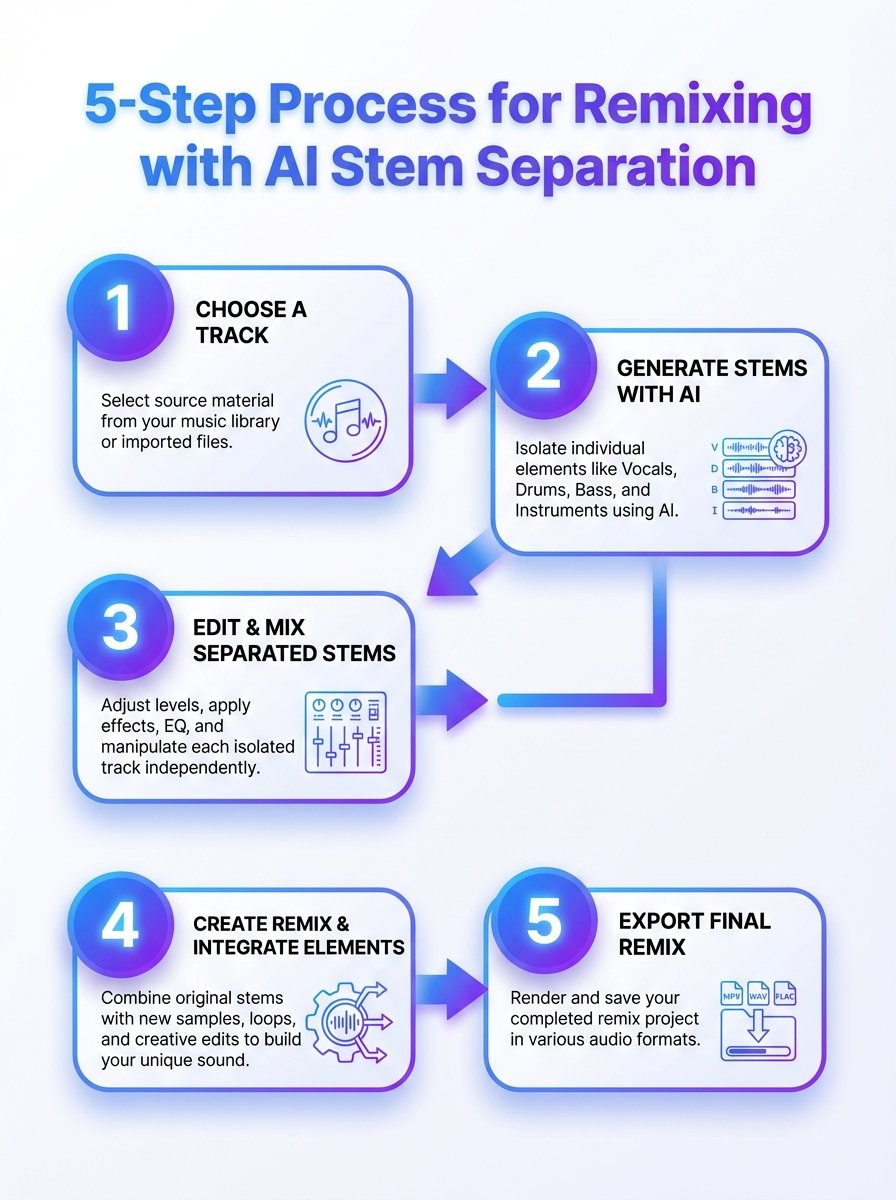
A 5-step guide to using AI stem separation for remixing and practice. Learn how stems are isolated and recombined to speed up workflows.
Our own approach for a remix is usually:
Pick a track with a vocal performance that moves you, not just a popular chart tune.
Separate into at least vocal, drums, bass, and “other”.
Audition each stem on its own, listen for artifacts, and clean with EQ or gating where needed.
Rebuild the groove or harmony around the vocal or another focal stem.
Mix with the same care you would give to real session stems, then master at the end.
Did You Know?
Music AI reports a 15.8% higher SDR score than its nearest competitor on average, which means noticeably cleaner stems for your remixes and practice tracks.
4. Building Practice Backing Tracks With AI Stems
For many of us, the real magic of AI stem separation is not the flashy remix, it is the simple ability to practice with the band we always wanted. You can mute your instrument in the mix and sit where that player used to sit, which is a brilliant, slightly terrifying, way to see what you can really do.
Guitarists can pull out the guitars and comp or solo over the original rhythm section. Drummers can remove the drum stem and play along with the intact bass, keys, and vocals, which is very close to a live rehearsal scenario.
Instrument specific practice ideas
Guitar: Remove guitars, loop tricky sections, slow down in a DAW, and study phrasing against the original vocal.
Bass: Solo the bass stem to transcribe, then mute it to test your own line with the drums and harmony.
Drums: Isolate drums to learn fills and ghost notes, then mute to practice your own grooves under the same song.
Vocals: Solo the vocal stem, work on timing and pitch, then sing against the instrumental stem.
This is particularly powerful when you approach soloing the way we describe in our jazz material: making more of what you already do, instead of hunting for magic scales. With stems, you can live in the pocket of a great rhythm section for hours, which is where real progress hides.
Turning albums into practice libraries
Once you get into the habit, you start thinking in albums, not tracks. Entire releases, like our own Friday’s Child, can be turned into structured practice sets where you have clear stems for rhythm, harmony, melody, and solos.
It is the sort of thing that, in the past, only education publishers did with very controlled multitracks. Now you can quietly build your own library at home and work through it at your own pace.
5. Practice Routines Using AI Stems (For Real Life Schedules)
We know what it is like to juggle work, gigs, and training on the bike. Fancy tools are useless if they do not fit into a messy day, so here are simple, repeatable ways to use AI stems without needing a spare lifetime.
The key is to keep things narrow: one song, one weak spot, one short loop, repeated often. AI does the heavy lifting of separation, you just show up and do the reps.
30 minute guitarist routine
5 minutes: listen to the original track once, no guitar in your hands.
10 minutes: loop a verse and chorus with the guitar stem soloed, and quietly sing or tap the rhythm of the part.
10 minutes: mute the guitar stem and play along, recording yourself on your phone.
5 minutes: compare your take against the original guitar stem and make one note for tomorrow.
For bassists and drummers, you can use exactly the same timing but swap which stems you listen to or mute. Vocalists can create A/B loops between the original vocal and their own take against the instrumental stem.
Longer weekend sessions
On days where you have more time, AI stems let you go deeper without getting lost in tech. You can separate a whole album in advance, label stems clearly, and then run longer play along sessions, switching songs while keeping your focus on one concept like time feel or phrasing.
It is the opposite of gear chasing. Once the stems are ready, all you are left with is you, your instrument, and the band that used to live only inside the stereo mix.
Did You Know?
LALAL.AI users uploaded 9.7 million files in 2024, fueling a huge wave of custom remixes and practice tracks built from AI-separated stems.
6. Mixing AI Stems So They Actually Sound Musical
Once you have your stems, the job is not finished, it is just familiar again. You are back in the world of levels, EQ, compression, and, most importantly, the human behind the performance.
In our own work, we always go back to what we call mixing to the musician. Two vocal stems might have the same frequency curve, but one singer is fragile and the other is bold, and they need different treatment if you want the mix to feel honest.
Cleaning up AI artifacts
Even the best models will leave you some work to do. You might hear light bleed from drums in a vocal stem, or a bit of the bass still living in the guitars, especially in dense mixes.
Typical fixes include:
Narrow EQ cuts on obvious bleed frequencies.
Noise gates or expanders on percussive or vocal stems.
Short fades around edits to avoid clicks, especially when looping sections.
Balancing stems like a normal session
After cleanup, you mix as you usually would. Set a solid rough balance, work on the drums and bass relationship, fit the vocal in, then decorate cautiously with effects.
We like to think of AI stems as being like a slightly messy live multitrack. If you maintain that mindset, you focus on musical problems instead of chasing technical perfection that does not really matter to anyone listening.
7. Mastering Tracks That Started From AI Stems
Once a mix feels right, mastering is still essential, no matter how clever the separation stage was. AI does not change the basic truth that mastering is about consistency, translation, and a sensible final polish.
As we explain in our mastering article, the goal is to have a track that sounds balanced and confident on phones, cars, cheap speakers, and a good studio system. AI stems can give you a great mix, but they will not make that last ten percent of finishing decisions for you.
Specific mastering checks for AI stem projects
Low end coherence: Make sure any slight separation smear between kick and bass has not turned into a muddy low end.
Top end harshness: Check that any AI artifacts have not left a “hiss” in the 8 kHz to 12 kHz range.
Phase issues: When stems are recombined, always check mono compatibility, especially with drums and wide guitars.
Loudness is a creative choice, but AI does not get you a free pass there either. We still recommend leaving enough headroom and dynamic range so the track can breathe, even if streaming platforms will normalise it later.
8. Top AI Stem Separation Use Cases For Working Musicians
We see AI stem separation showing up in all sorts of practical, slightly unglamorous ways, which is usually a good sign that a tool is genuinely useful. It is not just bedroom producers, it is teachers, cover bands, and even people preparing for radio or streaming features.
Here are some of the most common use cases we encounter when talking with other musicians.
Everyday uses
Cover band prep: Create key shifted, instrument specific backing tracks for live sets.
Teaching: Build slow, instrument focused versions of songs for students to practice.
Content creation: Prepare short stems for reels or YouTube breakdowns without needing the original session.
Archiving: Pull elements out of old demos and rework them with new arrangements.
For radio features or online premieres, AI stems allow you to make alternate mixes quickly, for example a more voice forward version for spoken intros. When we hear our own tracks on stations or playlists, we are very aware that flexibility counts.
Genre specific workflows
Jazz players might focus on rhythm section stems to study comping under solos. Blues and rock guitarists might live mostly in vocal and guitar stems to pick apart phrasing and bends from players like Peter Green.
Electronic producers might only care about drums and melodic hooks, using AI stems to resample and reshape loops into something completely unrecognisable from the source.
9. Limitations, Legal Questions, And Good Habits
AI stem separation is powerful, but it is not magic, and it does not remove your responsibility to think. There are technical limits and legal questions that every musician should at least be aware of.
On the technical side, extremely dense mixes, live recordings, or tracks with heavy effects can still confuse models. You might get more artifacts or bleed, and sometimes it is genuinely quicker to pick a cleaner song.
Legal and ethical points
We are not lawyers, so we will not pretend to offer formal advice here, but some broad principles are sensible:
For private practice, pulling stems from commercial tracks is generally low risk, and similar to playing along with a record.
For commercial remixes or releases, you still need the relevant permissions or licenses, regardless of how you got the stems.
For teaching content, many creators work under fair use or similar concepts, but local laws differ, so it is worth checking.
Ethically, it helps to remember there is a person behind every performance, just like we write about in our mixing article. Respect for that person’s work should guide how loud you shout about your AI separated stems in public.
10. Choosing An AI Stem Separation Tool That Fits You
There are plenty of tools out there, and new ones keep appearing, but you do not need to overthink it. Start with what you actually want to do, which is usually remix tracks, build practice material, or clean up audio for teaching and content.
Key questions to ask yourself include how many stems you need, how patient you are with processing times, and whether you want a web tool or something that runs inside your DAW.
Features that matter in daily use
Stem count: Do you just need vocals and backing track, or do you want drums, bass, guitars, keys, and more?
Quality: Look for clear examples and, if possible, references to benchmarks like SDR or independent tests.
Speed: Daily throughput numbers such as “2.5 million minutes per day” hint at how scalable a platform is.
Workflow: Simple export options into your DAW, clear file naming, and stable uptime all save you time.
Remember that you can always change tools later. The bigger decision is not which brand you pick, it is whether you commit to using AI stems as a regular part of how you practice, remix, and learn.
Conclusion
AI stem separation for remixing and practice is not science fiction anymore, it is just another tool in the bag, like a decent compressor or a metronome that does not argue. Millions of files and stems processed each year prove that ordinary musicians, teachers, and producers are already using it quietly in the background.
From our point of view, the real value is simple. AI helps you hear more clearly, gives you better material to work with, and then gets out of the way so you can do the one thing it still cannot do, which is to sound like you.